Table of Contents
ToggleA clogged Dyson filter can cut suction by 50% or more, turning a premium vacuum into an expensive floor decoration. Yet most owners skip filter maintenance entirely until the machine starts wheezing like it’s running a marathon. The good news? Cleaning and maintaining your Dyson vacuum filter takes about 15 minutes and zero special tools. This guide walks you through identifying your filter type, cleaning it properly, knowing when replacement beats cleaning, and troubleshooting common problems that keep your vacuum from performing at its best.
Key Takeaways
- A clogged Dyson vacuum filter can reduce suction by 50% or more, but cleaning it takes just 15 minutes and requires no special tools.
- Clean washable HEPA filters monthly (or weekly in homes with pets) using only cold water and allow at least 24 hours for complete drying to prevent mold and odor.
- Replace your Dyson vacuum filter annually or immediately if you notice persistent odors, visible tears, crushed pleats, or suction loss after washing—genuine OEM filters are worth the investment for allergy and asthma sufferers.
- Empty the dustbin at the two-thirds mark, pre-clean high-dust areas, and rotate between two filters if vacuuming heavily to extend filter lifespan and maintain peak performance.
- Never wash sealed ‘lifetime’ filters, avoid compressed air or brushes on pleated media, and never install a wet filter as it can short-circuit electronics or corrode the motor.
Why Your Dyson Vacuum Filter Matters More Than You Think
Dyson vacuums use cyclonic separation technology to trap dust and debris, but the filter acts as the final line of defense. It captures microscopic particles, allergens, pet dander, mold spores, that the cyclones miss. When the filter gets clogged with fine dust, airflow drops, motor temperature climbs, and suction plummets.
A dirty filter forces the motor to work harder, shortening its lifespan and increasing energy consumption. Dyson recommends cleaning washable filters at least once a month, though homes with pets or heavy vacuuming need weekly cleanings. Ignoring this step voids warranty coverage in some cases if motor damage results from neglect.
Beyond performance, a clean filter improves indoor air quality. A saturated filter can’t trap new particles, so allergens recirculate into your home. If you notice a musty smell during vacuuming, that’s often a filter caked with damp dust and organic matter, basically a petri dish spinning at 100,000 RPM.
How to Identify Your Dyson Filter Type
Dyson has shipped multiple filter designs across its model lineup. Knowing which type you have determines cleaning method and replacement schedule.
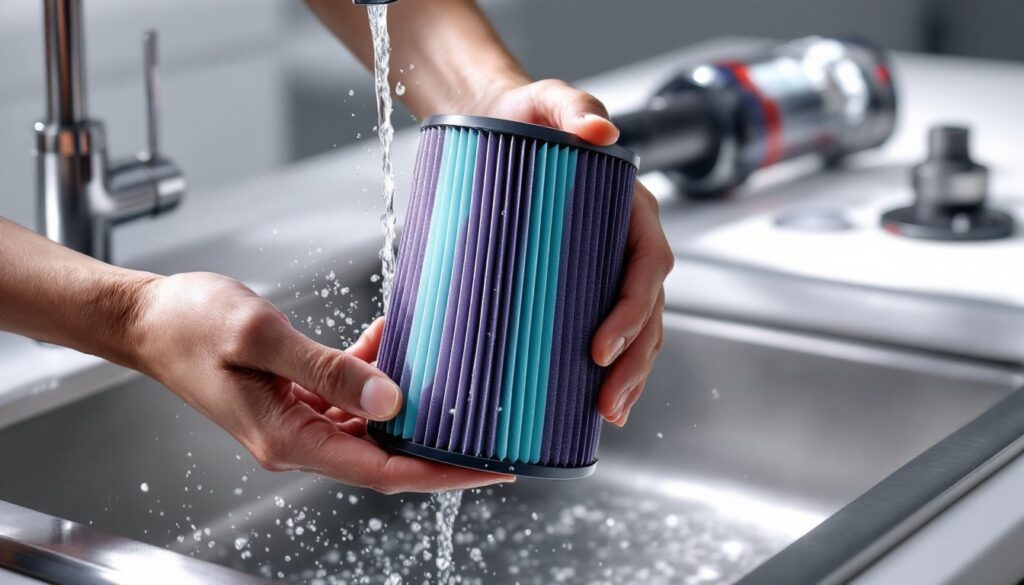
Washable HEPA filters (purple or teal): Found in V7, V8, V10, V11, V15, and most cordless stick models. These are cylindrical, about 3–4 inches tall, and snap into the rear or top of the machine. The V11 and newer models often include a second pre-filter near the dustbin.
Lifetime HEPA filters (sealed units): Some Ball and canister models (DC41, DC65, Cinetic series) have filters Dyson claims never need washing. These are typically enclosed in a plastic housing and aren’t user-serviceable.
Pre-motor filters (foam or felt): Upright models like the DC07, DC14, and DC33 use a washable foam cylinder near the motor. These require rinsing every three months.
Check your model number (printed on the serial plate, usually near the dustbin or handle). Cross-reference it on Dyson’s support site or in your user manual. If you’ve lost the manual, a quick search for “[model number] filter type” usually pulls up parts diagrams. The Dyson V11 filter replacement process, for instance, is identical to the V10 and V15, twist counterclockwise and pull.
Misidentifying your filter can lead to damage. Don’t wash a “lifetime” sealed filter: you’ll destroy the media. And don’t skip washing a standard HEPA filter thinking it’s self-cleaning, it’s not.
Step-by-Step: Cleaning Your Dyson Vacuum Filter
Before you start, power off the vacuum and unplug it (or remove the battery on cordless models). Work over a sink or outdoors: this gets messy.
- Remove the filter: Twist or pull the filter from its housing. On stick models, it’s usually at the top near the handle. On uprights, check behind the dustbin or at the base.
- Tap out loose debris: Hold the filter over a trash can and tap it against your palm. You’ll be shocked how much dust falls out.
- Inspect the pleats: Look for tears, discoloration, or a crushed shape. Minor grime is fine: structural damage means replacement.
Don’t use compressed air or a brush on pleated HEPA filters. Both can tear the delicate media or push particles deeper into the folds.
Washing and Drying Your Filter Properly
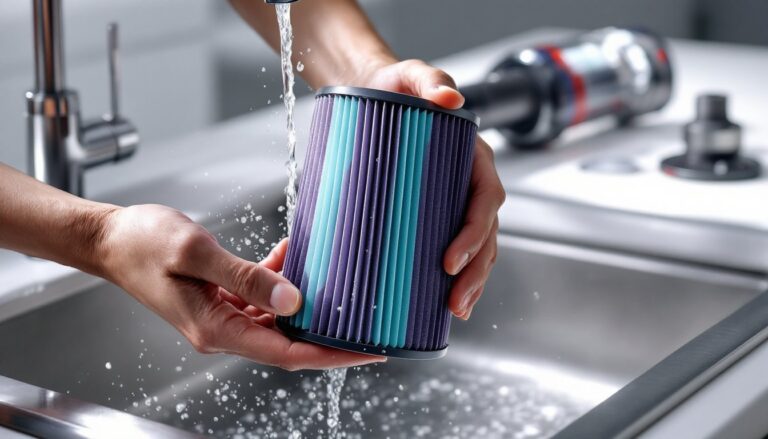
Washing: Hold the filter under cold running water. Dyson specifically warns against hot water, which can warp the plastic frame and degrade adhesives. Gently squeeze and flex the filter as water runs through it, working from the outer pleats inward. No soap, no detergent, just water. Soap residue reduces filtration efficiency and can trigger allergies.
Keep rinsing until the water runs clear. This usually takes 2–3 minutes per filter. If your water stays gray, the filter may be too clogged to salvage.
Drying: Shake out excess water and place the filter upright in a well-ventilated spot. Room temperature is fine: don’t use a hairdryer, radiator, or direct sunlight. Heat causes warping and shrinkage.
Dyson states filters need at least 24 hours to dry completely. In humid climates, allow 36–48 hours. A damp filter will smell musty and can grow mold. Squeeze the pleats gently: if any moisture comes out, it’s not ready. Installing a wet filter can short-circuit electronics or corrode motor components. According to guidance from experts on cleaning Dyson filters properly, ensuring complete dryness is the most commonly skipped step that leads to odor and performance issues.
When to Replace Your Dyson Filter Instead of Cleaning
Washable filters aren’t immortal. Dyson recommends replacement every 12 months even with regular cleaning. Why? Microscopic particles embed in the media over time, and the pleats lose structural integrity.
Signs it’s time for a new filter:
- Persistent odor even after washing and drying. That’s usually mildew or degraded filter material.
- Visible tears or holes in the pleats. Even small gaps let unfiltered air (and allergens) back into your home.
- Crushed or misshapen pleats that don’t spring back after washing. This reduces surface area and airflow.
- Suction doesn’t improve after cleaning. If the machine still feels weak with a freshly washed filter, the media is spent.
- Discoloration or staining that won’t rinse out. Some particles (candle soot, fireplace ash, fine concrete dust) permanently clog HEPA media.
Genuine Dyson replacement filters cost $30–$50 depending on the model. Third-party options run $12–$25 on Amazon, but quality varies. Cheap filters often use lower-grade media that doesn’t meet HEPA standards (99.97% capture of 0.3-micron particles). If you have allergies or asthma, stick with OEM parts. For the dyson vacuum filter replacement V11 and similar models, ensure you’re buying the correct part number, generic “fits V11” listings sometimes ship V10 filters that look similar but have slightly different dimensions.
Common Dyson Filter Problems and How to Fix Them
Musty smell during use: This usually means the filter wasn’t fully dry before reinstallation, or organic matter (pet hair, food particles) is stuck in the pleats. Remove the filter, wash again, and dry for a full 48 hours in a dry space. If the smell persists, replace the filter, mold can grow inside the media where you can’t see it.
Suction loss even though a clean filter: Check the dustbin seal and cyclone assembly for clogs. On V-series stick models, the post-motor filter (a small disc behind the main unit) also needs monthly rinsing. A blocked hose or brush bar can mimic filter problems.
Filter won’t seat properly: Inspect the housing for cracks or warped plastic. Overtightening during installation can strip threads or bend tabs. If the filter spins freely without clicking, the locking mechanism may be broken, contact Dyson support or replace the housing.
Water draining into the vacuum: You installed the filter wet. Disassemble, dry everything thoroughly, and inspect electronics for corrosion. Water damage isn’t covered by warranty.
Pulsing suction (motor cuts in and out): On cordless models, this often signals an airflow blockage triggering thermal protection. Clean the filter, check the bin, and clear the wand. If pulsing continues with everything clean, the battery may be failing, or the motor needs service.
Maintenance Tips to Extend Your Filter’s Lifespan
Empty the dustbin before it hits the max line. A full bin forces dust back toward the filter, caking it faster. On most models, empty at the two-thirds mark.
Pre-clean high-dust areas. Sweeping or dusting before vacuuming reduces the volume of fine particles that hit the filter. Skip vacuuming fireplace ash or drywall dust entirely, those ultra-fine particles destroy HEPA filters in one session. Use a shop vac with a disposable bag instead.
Rinse monthly, minimum. Set a recurring reminder. Waiting until suction drops means you’ve already damaged the filter.
Rotate two filters if you vacuum heavily or have multiple pets. Keep one in use while the other dries. This prevents the temptation to reinstall a damp filter.
Store the vacuum in a dry space. Garages and basements with high humidity encourage mold growth in dirty filters. If you must store in a damp area, remove and store the filter separately in a sealed plastic bag.
Check seals and gaskets. The rubber seal between the filter and housing degrades over time. A poor seal lets unfiltered air bypass the media. Replace seals if they’re cracked or no longer springy.
Avoid vacuuming liquids or wet debris. Dyson stick and upright models aren’t wet/dry vacs. Moisture wrecks the filter and can corrode the motor. If you accidentally suck up liquid, remove the filter immediately, dry all components, and replace the filter if it smells off.
For smart home integration, some users track filter cleaning schedules through home automation apps or reminders synced with their devices, though Dyson vacuums don’t currently ship with native IoT features. If you’re managing other connected home systems, reviews from sources like CNET can help you build routines that include vacuum maintenance alongside other household tasks.